Make a Cricut Infusible Ink mug

Plan one Cricut 12 oz mug with an exact Mug Press, Joy Xtra cutter, mat, transfer sheet, source-scoped cut bounds, and automatic cycle.

Planned finished item

One Cricut Infusible Ink transfer on a Cricut 12 oz white ceramic Mug Blank, prepared and pressed in the Cricut Mug Press. This is a cut-sheet Infusible Ink workflow; no sublimation printer or printed-paper transfer is used.

Cricut Ceramic Mug Blank, White, 12 oz/340 ml, 2 ct, item 2007821

Source: Cricut: Ceramic Mug Blank, White - 12 oz/340 ml (2 ct)

Cricut 12 oz maximum design length
8.75 in
Source: Cricut Help Center: Cricut Mug Press FAQ
Cricut 12 oz maximum design height
3.79 in
Source: Cricut Help Center: Cricut Mug Press FAQ

Artwork requirements

No single source-backed artwork target is established. Use the source-backed limits and requirements below; listed dimensions are not necessarily usable decorated area.

  • Cricut lists a maximum 12 oz design size of 8.75 in long by 3.79 in high and asks for at least 0.5 in clearance from the handle; that is a maximum, not a suggested size.
  • The Joy Xtra's listed cut area with a mat is 8.2 × 11.7 in. Fit the cut sheet within the actual cutter/mat orientation and the mug limit; the selected design may be smaller.
  • The exact True-Blue sheet page's compatibility list names Maker and Explore families, not Joy Xtra; Cricut's separate general Infusible Ink FAQ includes Joy Xtra. Keep this evidence scope visible.

These are Cricut's maximum design limits, not a measured usable or coated area on the mug and not a recommended graphic size. No source-backed recommendation for one artwork size is established.

The source sheet is 4.5 × 12 inches. Do not enlarge art beyond the selected transfer-sheet dimensions or Cricut's mug limit.

Bill of materials

Equipment

  • Cricut Mug Press · Cricut Mug Press, item 2008735
  • Cricut Joy Xtra Smart Cutting Machine · Cricut Joy Xtra; item 2010313

Ordered steps

  1. Step 1

    Confirm item 2007821, the white 12 oz Cricut Ceramic Mug Blank. One purchased pack contains two mugs; set one aside for a first run and one for the planned final design. Cricut identifies this blank as compatible with its Mug Press and Infusible Ink. No printer or sublimation paper is part of this cut-sheet workflow.

    Source: Cricut: Ceramic Mug Blank, White - 12 oz/340 ml (2 ct)

  2. Step 2

    Plan the art within the manufacturer's 8.75 × 3.79-inch maximum for its 12 oz mug and keep at least 0.5 inch from the handle. The selected 4.5 × 12-inch True-Blue transfer sheet and Joy Xtra mat/cut bounds are additional constraints. The exact transfer-sheet page lists Maker and Explore families, while Cricut's general Infusible Ink FAQ also lists Joy Xtra; the exact SKU page does not make a Joy Xtra-specific compatibility claim.

    Source: Cricut Help Center: Infusible Ink FAQ; Cricut, Inc.: True-Blue Cricut Infusible Ink Transfer Sheets, 2-Pack; Cricut, Inc.: Cricut Joy Xtra; Cricut Help Center: Cricut Mug Press FAQ

  3. Step 3

    Cut the pre-inked transfer sheet with the Cricut Joy Xtra on its StandardGrip mat. Cricut says to cut Infusible Ink sheets with a compatible Cricut machine and use a StandardGrip mat. Trim the transfer-sheet liner close to the design and follow Cricut's current machine instructions for loading and cutting.

    Source: Cricut Help Center: Infusible Ink FAQ; Cricut, Inc.: True-Blue Cricut Infusible Ink Transfer Sheets, 2-Pack; Cricut Help Center: Cricut Mug Press FAQ

  4. Step 4

    Preheat the Mug Press as directed. Remove dust or lint from the mug with a lint roller or lint-free cloth, align the design on the smooth straight surface at least 0.5 inch from the handle, wrap it without gaps, and secure the edges with Cricut Heat Resistant Tape. Place the design flat and trim excess liner near its edges.

    Source: Cricut, Inc.: Cricut Heat Resistant Tape; Cricut Help Center: Infusible Ink FAQ; Cricut Help Center: Cricut Mug Press FAQ; Cricut Help Center: Cricut Mug Press - Compatible Materials and Mug Prep Instructions

  5. Step 5

    Place the mug right side up in the Mug Press with its bottom resting on the base heater. Use the press's one-touch automatic cycle. Cricut does not provide manual time, temperature, or pressure settings; its roughly six-minute average is a cycle-duration description, not an operator setting.

    Source: Cricut: Cricut Mug Press; Cricut Help Center: Cricut Mug Press FAQ; Cricut Help Center: Cricut Mug Press - Compatible Materials and Mug Prep Instructions

  6. Step 6

    Wait for the completion lights and beep, then remove the mug carefully by its handle. Place it on a heat-resistant surface and allow it to cool fully; Cricut's FAQ says 15–30 minutes before handling. Peel away the transfer sheet after it has cooled, and observe the press's adult-use, burn-risk, and ventilation guidance.

    Source: Cricut: Cricut Mug Press; Cricut Help Center: Cricut Mug Press FAQ; Cricut: All about Cricut Mug Press

  7. Step 7

    Compare the test mug with the intended cut design and record the exact blank, sheet color/item, cutter, mat, tape, and completion cycle. Do not convert the average cycle time into a manual setting or treat this Infusible Ink path as a recipe for printed sublimation paper.

    Source: Cricut: Ceramic Mug Blank, White - 12 oz/340 ml (2 ct); Cricut Help Center: Infusible Ink FAQ; Cricut, Inc.: True-Blue Cricut Infusible Ink Transfer Sheets, 2-Pack; Cricut: Cricut Mug Press

Completion checks

Troubleshooting

This project uses Cricut Infusible Ink Transfer Sheets with Cricut's Mug Press and white 12 oz Ceramic Mug Blank, item 2007821. It is a cut-sheet process: the transfer sheet is pre-inked, so this bill of materials does not include a sublimation printer, bottled ink, or printed transfer paper. Keep this Cricut workflow separate from the printer-and-paper projects elsewhere on the site.
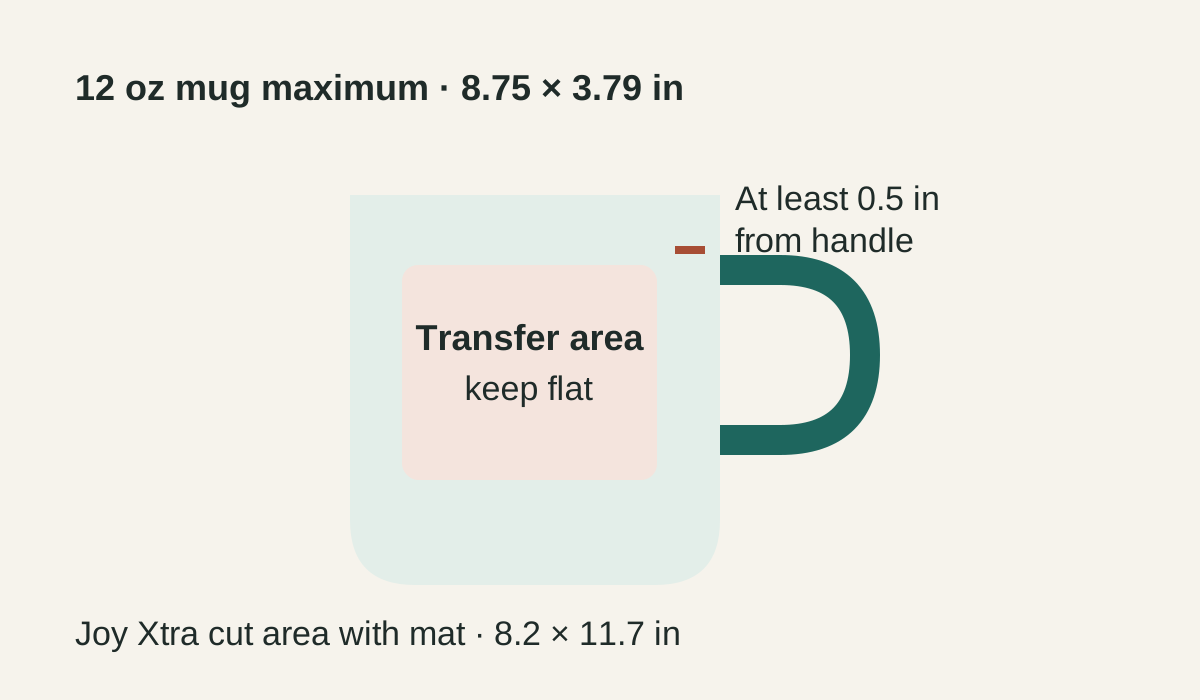
Original Cricut mug workflow schematic showing the handle clearance, manufacturer maximum design dimensions, and separate Joy Xtra cut-area constraint.

BOM quantity 1 for item 2007821 means one two-mug blank pack. Use one mug for the first run and the other for the planned final transfer. The transfer-sheet offer has a dated price observation but stock was not confirmed; check the selected sheet variant before ordering.

Check the item and cut limits

One blank listing is a two-mug pack. Reserve one mug for a test and one for the planned final transfer. Cricut lists an 8.75 × 3.79-inch maximum design for its 12 oz mug and asks for at least 0.5 inch of handle clearance. Those are maximum limits, not a recommended graphic size or a measurement of coated area. The Joy Xtra's machine cut area with a mat is 8.2 × 11.7 inches, and the selected transfer sheet itself is 4.5 × 12 inches. Fit the design within the actual sheet, cutter, and mug limits; choose a smaller target when the design or blank requires it.

The exact True-Blue item 2011895 page names Maker and Explore families in its compatibility list, while Cricut's broader Infusible Ink FAQ includes Joy Xtra. That is family-level support, not a Joy Xtra-specific claim on this exact color page. Check the exact item's current machine directions before cutting.

Use the automatic press cycle

Cricut specifies an automatic one-touch Mug Press cycle and does not expose manual temperature, pressure, or time controls. Its FAQ describes an average cycle of about six minutes, which varies with conditions; do not use that as a recipe setting. Cricut's prep steps cover lint removal, a flat transfer without gaps, edge tape, upright loading with the mug bottom on the base heater, completion lights/beep, and cooling before transfer removal. Follow those exact directions and use the device only in a well-ventilated area with adult supervision.

Save this plan with the Save project control to keep it in this browser. Open My setup to export the workspace, or print the project from its action bar. For costing, allocate one half of the two-mug pack price to each mug attempt and one half of the two-sheet transfer pack price to each transfer. Model the first mug as a failed attempt only if it is not saleable; check sheet stock before ordering. Use the project pricing calculator with your own supply costs; the prices below are dated observations, not a current project total.

Cricut's U.S. pages checked on 2026-09-23 displayed $7.99 for the 2-count blank, $4.79 sale price for the selected True-Blue sheet, and $5.99 sale price for the StandardGrip mat. The pages exposed Add to Cart controls but did not state stock status for those exact variants. These observations are not current purchase promises and are not added into a project total.

Sources and review date

The Cricut product, help, and tutorial pages were checked 2026-09-23. This is a source-based procedure; no physical test or transfer result is claimed. The original schematic is not a blank template.

Continue with the coated tumbler project or browse all projects.