Make a Cricut Infusible Ink wine bag

Plan one Cricut Wine Bag Blank, item 2008212, with cut-sheet Infusible Ink and preserve Cricut’s conflicting liner-removal instructions.

Planned finished item

This project uses one Cricut Wine Bag Blank, item 2008212, with a pre-inked Infusible Ink sheet. The listing describes one white canvas-texture bag with a drawstring and a 5.8 × 13 inch outside size. That measurement is not a design template. Cricut’s sheet is cut with a compatible Cricut machine; this path has no sublimation printer, bottled ink, or printed transfer paper.

Cricut Wine Bag Blank, item 2008212

Source: Cricut, Inc.: Cricut Wine Bag Blank, item 2008212

Wine bag listed width
5.8 in
Source: Cricut, Inc.: Cricut Wine Bag Blank, item 2008212
Wine bag listed height
13 in
Source: Cricut, Inc.: Cricut Wine Bag Blank, item 2008212

Artwork requirements

Measure the wine bag's front below the drawstring. Measure the actual flat front below the drawstring channel before sizing a single motif; the listed 5.8 × 13 in dimensions describe the whole bag, not a usable artwork rectangle.

  • Measure the actual flat bag panel; the listed product dimensions are outside measurements, not a design template.
  • Keep graphics clear of seams, edges, and the interior seam allowance. No numeric art boundary or seam inset is published.
  • Keep the complete design smaller than the 12 × 10 in plate and apply it once; do not infer multi-section compatibility from the Heat Guide.

No numeric artwork size or supplier template was verified.

The selected Heat Guide names EasyPress SE by family and does not ask for press size. The BOM identifies 12 × 10 in as the chosen tool, not a Heat Guide size selection.

Source: Cricut, Inc.: Cricut Wine Bag Blank, item 2008212

Bill of materials

Equipment

Press guidance by equipment class

These supplier instructions name a class or application; they do not verify a particular press model.

Source-scoped starting settings

infusible ink · Cricut EasyPress SE

Temperature
385 F
Time
60 seconds
Pressure
Firm
  • Mirror/cut/weed the transfer sheet and trim the liner close to the design. Use a fresh adhesive lint roll over the full blank; place protective cardstock or four butcher-paper layers inside the bag.
  • Use the source-specific bag sequence: place bag on mat, place protective material inside, lint-roll, cover with clean butcher paper, preheat the bag, remove top paper, place design face down / liner side up, cover with clean paper.
  • Avoid the inside seam allowance and outer seams/edges. Cricut states these can create unevenness but does not publish a numeric artwork inset. Measure the actual flat panel instead of treating the listed 5.8 × 13 in product size as print area.
  • Press once without sliding the EasyPress; lift slowly. Do not resolve the warm-peel versus cool-peel conflict by assumption.
  • Care: machine wash inside out in cold water with mild detergent; tumble dry low or line dry; avoid softener, dryer sheets, and bleach.

Conflicting source instructions

Cricut’s live Heat Guide says remove the liner while warm; its separate How to Use Infusible Ink article says let the project cool completely, then slowly remove paper and liner. Preserve both source instructions and do not choose one silently. Source: Cricut, Inc.: Cricut Heat Guide: Infusible Ink Square Coaster and Bag Results; Cricut Help Center: How to Use Infusible Ink

Checked . Source: Cricut Help Center: Cricut EasyPress FAQ; Cricut, Inc.: Cricut EasyPress SE – 12 in × 10 in; Cricut, Inc.: Cricut EasyPress SE – 9 in × 9 in; Cricut, Inc.: Cricut Heat Guide: Infusible Ink Square Coaster and Bag Results; Cricut Help Center: How to Use Infusible Ink; Cricut, Inc.: Cricut Wine Bag Blank, item 2008212

Ordered steps

  1. Step 1

    Confirm the exact Cricut Wine Bag Blank, item 2008212. The listed measurements describe the outside of the selected bag, not a transfer template; choose a flat area clear of seams and edges.

    Source: Cricut Help Center: How to Use Infusible Ink; Cricut, Inc.: Cricut Wine Bag Blank, item 2008212

  2. Step 2

    Measure the actual flat panel before making artwork. Cricut gives no numeric decorated-area size or seam inset for this blank. Keep the entire design smaller than the EasyPress plate so it can be applied once, without pressing in sections.

    Source: Cricut Help Center: Cricut EasyPress FAQ; Cricut Help Center: How to Use Infusible Ink; Cricut, Inc.: Cricut Wine Bag Blank, item 2008212

  3. Step 3

    Mirror the design and cut the pre-inked Black Infusible Ink sheet liner-side down on StandardGrip. Crack-weed it and trim the clear liner close to the art. Maker 4 is in Cricut’s Maker family; the sheet listing names the Maker family but not item 2011084 individually.

    Source: Cricut Help Center: How to Use Infusible Ink; Cricut Help Center: Infusible Ink FAQ; Cricut, Inc.: Black Infusible Ink Transfer Sheets, item 2011320; Cricut, Inc.: Cricut Maker 4, item 2011084

  4. Step 4

    Place the bag on a firm, even surface above the Cricut pressing mat. Insert white 80 lb cardstock or four butcher-paper layers, lint-roll the full surface, and cover with clean butcher paper. Preheat the blank for 15 seconds per the Heat Guide, then let it cool completely before applying the transfer as Cricut’s separate how-to directs.

    Use the listed settings context.

    Source: Cricut Help Center: Cricut EasyPress FAQ; Cricut, Inc.: Cricut Heat Guide: Infusible Ink Square Coaster and Bag Results; Cricut Help Center: How to Use Infusible Ink

  5. Step 5

    Place the design face down with the liner up and cover it with clean butcher paper. Keep the EasyPress still. Follow the checked U.S. Heat Guide setting of 385°F for 60 seconds with Firm pressure. The selector names EasyPress SE by family and does not ask for plate size; this BOM lists the 12 × 10 in SKU, so verify the full measured design fits before pressing.

    Use the listed settings context.

    Source: Cricut Help Center: Cricut EasyPress FAQ; Cricut, Inc.: Cricut EasyPress SE – 12 in × 10 in; Cricut, Inc.: Cricut Heat Guide: Infusible Ink Square Coaster and Bag Results; Cricut Help Center: How to Use Infusible Ink

  6. Step 6

    Lift slowly. Cricut’s live Heat Guide says remove the wine bag liner while warm; its separate How to Use Infusible Ink article says cool the project completely before removing paper and liner slowly. These instructions conflict, so do not combine them into a new timing. After the item is cool, follow the blank’s care instructions.

    Use the listed settings context.

    Source: Cricut, Inc.: Cricut Heat Guide: Infusible Ink Square Coaster and Bag Results; Cricut Help Center: How to Use Infusible Ink; Cricut, Inc.: Cricut Wine Bag Blank, item 2008212

Completion checks

Troubleshooting

Artwork is too large for one plate application

  • Reduce it until the entire design is smaller than the selected plate. Cricut says not to press Infusible Ink designs in sections.

Source: Cricut Help Center: Cricut EasyPress FAQ

This plan is for one Cricut Wine Bag Blank, item 2008212: a white canvas-texture bag with a drawstring and listed outside dimensions of 5.8 × 13 inches. The pre-inked Infusible Ink sheet is cut with a Cricut machine, so this route uses no printer, bottled ink, or printed sublimation paper.
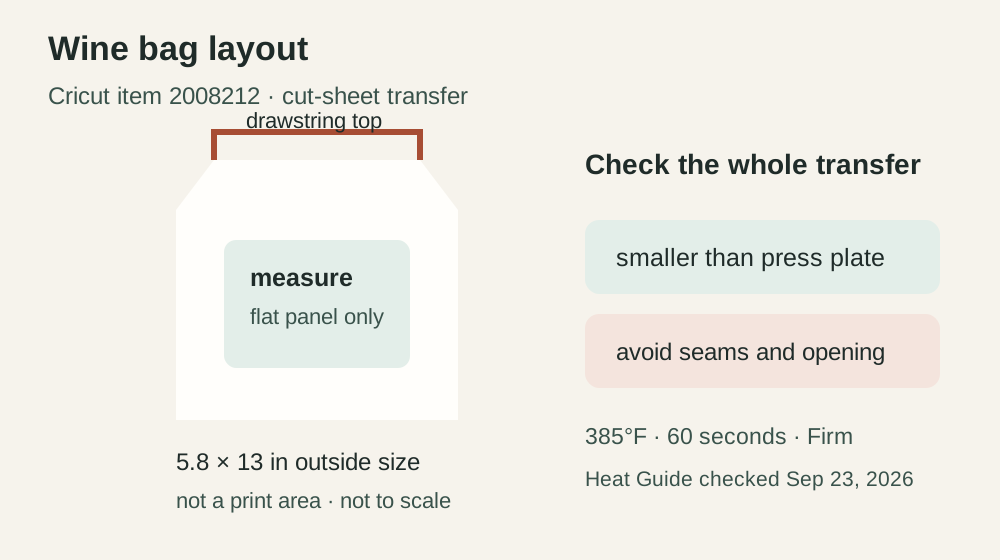
Original schematic showing the Cricut wine bag outline, its listed outside size, and an unmeasured decoration panel.

Plan a tall, single-panel motif

The wine-bag format calls for a vertical composition that sits below the drawstring channel. Set the bag with its opening at the top, then measure the flat front on the actual item. Keep the design clear of the channel, seams, and edges because Cricut warns that seam allowances can make the pressing surface uneven. The 13-inch exterior height is not a design length; Cricut publishes no artwork boundary or numeric seam inset.

Keep the art within one press area

Prepare one complete motif that fits smaller than the selected EasyPress plate, with no overlapping sections. The Cricut Heat Guide output names the EasyPress SE family but does not ask for its plate size. This project lists the 12 × 10-inch model, so confirm the entire measured composition fits that plate before cutting the sheet. The taller exterior size alone does not establish that the design will fit.

Use the wine-bag Heat Guide result

Cricut’s U.S. selection for EasyPress SE, Infusible Ink Transfer Sheet, Wine Bag, and Cricut Pressing Mat returns a 15-second preheat followed by 385°F for 60 seconds at Firm pressure. As with the cosmetic-bag selection, the result is family-level and does not identify the 12 × 10-inch SKU. Cricut’s wine-bag result says to remove the liner while warm, while its separate How to Use Infusible Ink article says to cool completely before removing paper and liner. Keep these source directions separate and check the current instructions for the exact blank. The product page says wash cold, tumble dry low, and avoid bleach and dry cleaning.

Cost the single wine bag

One BOM quantity for this blank is one bag, unlike the cosmetic-bag project’s mixed-size three-pack. The exact U.S. page displayed $7.99 and Add to Cart on September 23, 2026, without an explicit availability statement. Treat it as a dated price observation only. Enter actual purchased supplies and consumed material in the project pricing calculator, save or print the project from its page actions, or use My setup to export the saved workspace. The design-size helper can convert your measured front-panel dimensions, but cannot infer a printable length from the bag’s overall height.

Related projects

For a compact pouch that comes in two sizes in one pack, see the Cricut Infusible Ink cosmetic-bag plan. Compare the cut-sheet workflow with the printed MakerFlo leatherette coaster or the Cricut mug transfer.

Source review

Cricut’s exact product page, help articles, and U.S. Heat Guide were checked September 23, 2026. This procedure remains an untested plan. The diagram uses original shapes and does not supply a template.