Start with the documented SP1 choice
For the Brother SP1 Windows coaster lesson, use Brother SP01PL retail sublimation paper, Letter 8.5 × 11 inches, 100 sheets. Brother lists it for SP-1/SP-1W. Load the printing surface face down in the tray, set Letter in the driver, preserve 100% scale and mirror the unmirrored project artwork exactly once. The lesson includes a one-inch proof square to measure before pressing.
That is one reproducible paper decision from manufacturer documentation. It is not a comparison test of color, release, feeding or ink consumption. The printer’s included ten-sheet SP01PLS sample has a different SKU from retail SP01PL; do not confuse a sample quantity with a replacement pack.
Scroll horizontally to compare all columns.
| Your printer and installed ink | Documented starting choice | Next check |
|---|---|---|
| Brother SP1, genuine SP01 | SP01PL Letter retail pack | Follow the SP1 print lesson |
| Epson F170 or base F570, supported sublimation ink | MakerFlo 8.5 × 11, 100-sheet paper listing names both models | Confirm media/print settings in the exact Epson manual; the listing does not name F570 Pro |
| SG500/SG1000, conventional SubliJet UHD | Sawgrass support recommends TruePix Classic; MakerFlo’s named Letter listing also names both printers | Resolve the retail TruePix pack’s Classic identity before treating the names as equivalent |
| SG500/SG1000, installed VersiFlex | VersiFlex Light only for the corresponding transfer route | Follow the exact material instructions; ordinary sublimation paper is not a substitute for that Light route |
Conventional sublimation papers
Scroll horizontally to compare all columns.
| Exact paper | Listed format and pack | What the source establishes | Printer scope in this catalog |
|---|---|---|---|
| Brother Sublimation Paper SP01PL | Letter, 8.5 × 11 in, 100 sheets | Brother lists retail paper SKU SP01PL under SP-1/SP-1W consumables | Source-backed for Brother SP1 in the US catalog |
| MakerFlo Sublimation Paper | 8.5 × 11 in, 100 sheets; 120 g/m²; single-sided coating | MakerFlo lists paper details and named printer compatibility | MakerFlo lists Epson F170, Epson F570, Sawgrass SG500, and Sawgrass SG1000; not the F570 Pro |
| HTVRONT Sublimation Transfer Paper | Selected numeric option: 8.5 × 11 in, 150 sheets; 120 g/m² | The page specifies inkjet printing with sublimation ink only and names example applications | No exact printer model is listed in the source record |
| Sawgrass TruePix Sublimation Paper | 8.5 × 11 in, 100 sheets | Retail pack is labeled TruePix; manufacturer support recommends TruePix Classic | Sawgrass documents TruePix Classic in its SG500 workflow; confirm the retail pack’s Classic identity before treating the names as identical |
These are product-page facts, not proof that the papers perform equally or work in every printer sold by the same brand. Check the exact model, region, ink system, selected paper size, and current manual before choosing a pack.
Match the paper to the exact printer
For the Brother SP1, Brother's US support catalog lists retail paper SKU SP01PL under the SP-1/SP-1W consumables page. Keep that 100-sheet paper pack distinct from the printer's in-box sample SKU SP01PLS. The SP1 carton table lists 10 sample sheets as SP01PLS; it is not the same exact SKU as retail SP01PL.
MakerFlo's 8.5 × 11-inch, 100-sheet paper listing explicitly names Epson F170, Epson F570, Sawgrass SG500, and Sawgrass SG1000 as compatible models. The listing does not name the Epson F570 Pro, so this guide does not extend that compatibility claim to SCF570PE. MakerFlo also specifies 120 g/m² and a single-sided coating for the selected paper; follow the exact printer and paper instructions for print side and settings.
HTVRONT's listing describes a selected 8.5 × 11-inch, 150-sheet, 120 g/m² paper option. It gives a general requirement to use an inkjet printer with sublimation ink only, but the reviewed source does not name a particular printer model. A general inkjet instruction is not an exact printer compatibility check. The product page uses “A4” in its option wording alongside the numeric 8.5 × 11-inch dimensions; use the selected numeric format when planning a Letter sheet.
Sawgrass’s paper support article recommends TruePix Classic for most sublimation transfer jobs, and its SG500 tray article explicitly names TruePix Classic in that model’s workflow. For an SG500 with SubliJet ink, TruePix Classic Letter is therefore a documented starting paper, not an unsupported brand inference. The linked retail 100-sheet Letter pack and its package image say “TruePix” without “Classic”; ask Sawgrass to confirm that exact pack identity when ordering rather than asserting an unverified SKU equivalence.
Load Sawgrass conventional paper on the right side
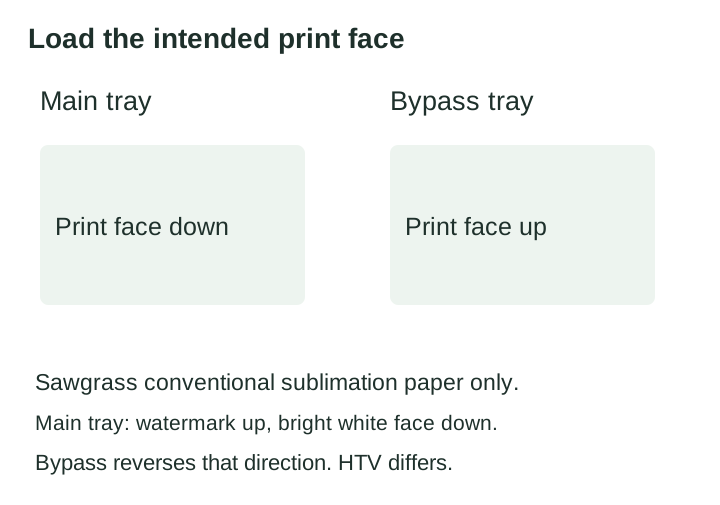
For the documented Sawgrass main-tray path, load the bright white print face down, with any watermark facing up. The paper instructions reverse that orientation for the bypass. They also specify different loading for EasySubli HTV, so this diagram is not a direction for every medium or printer. Select the matching tray, Letter size and supported paper option in Print Utility before checking the preview.
Keep VersiFlex in its own workflow
Scroll horizontally to compare all columns.
| Separate transfer medium | Supported pairing | Next action |
|---|---|---|
| VersiFlex Light, Letter, 100 sheets | SG500/SG1000 using VersiFlex ink and the corresponding Light-media method | Confirm that the printer is already configured for that ink system; use its named white/light-substrate instructions |
VersiFlex Light is named Heat Transfer Paper by Sawgrass. The official Sawgrass VersiFlex ink listing pairs the Light paper with the SG500 or SG1000 for its quick-start workflow. Sawgrass also says VersiFlex is not standard sublimation ink and warns not to mix it with SubliJet UHD because using the wrong ink may damage the printer.
Sawgrass distinguishes the VersiFlex print-and-press workflow for natural fibers from SubliJet UHD sublimation for high-polyester fabrics and coated products. That makes the VersiFlex Light paper a separate choice from TruePix or another conventional sublimation paper. Do not put VersiFlex Light in a conventional sublimation-paper comparison as if the products were interchangeable, and do not mix the ink systems.
Check sheet size and printable bounds separately
The listed packs use 8.5 × 11-inch sheets, but equal paper dimensions do not mean equal compatibility or equal imageable area. The sheet size says how large the paper is. It does not establish how much a specific printer, driver, or application can print on it, and it does not establish the blank's coated or usable area.
For a documented printer example, Epson's F570 User's Guide lists Letter sheets in the auto sheet feeder and 0.12-inch margins on all four sides. That yields a calculated nominal interior of 8.26 × 10.76 inches for that specific F570 cut-sheet path. Software or driver settings can reduce the actual imageable bounds. See the printable-area planning guide before fitting artwork to a sheet or blank; the design-size helper converts dimensions you enter but does not detect printer margins.
MakerFlo also lists 8.5 × 14, 11 × 17, and 13 × 19-inch sheets, plus 17-inch and 24-inch, 100-foot rolls. It names its 17-inch and 24-inch rolls as compatible with the Epson F570. These are supplier-listed format options, not separate exact paper records or verified offers in this catalog. A larger sheet or roll does not establish a printer's printable area; check the exact model's media path and manual before selecting a size.
When the source names no exact printer relationship, mark it as unverified and consult the current model instructions. Do not fill an evidence gap by relying on a paper's size, a printer brand, a product-family name, or a general process label.
Try the documented desktop route
Use the Brother SP1 Windows print lesson to print the original coaster PDF at actual size, mirror once and measure its proof square. Continue to the printed hardboard coaster project for the named blank and complete supplier instructions. This is source-documented work, not a claimed hands-on result.
Sources and review date
Sawgrass’s paper support, SG500 tray article and the retail TruePix package image were rechecked on October 3, 2026. The tray article’s 51-inch SG500 claim conflicts with current support; see the printable-area guide. Paper-family support does not resolve that media-length conflict.
The manufacturer and supplier pages below were checked on 2026-09-22. Product facts are paraphrased and linked directly. No paper performance comparison or physical test is claimed, and no manufacturer product photography is reused.
- Brother US SP-1/SP-1W consumables and options: SP01PL size, count, and listed model family.
- Brother SP1 Sublimation Printer: in-box sample SKU SP01PLS and 10-sheet carton quantity.
- MakerFlo Sublimation Paper, selected 8.5 × 11-inch variant: selected pack, basis weight, one-sided coating, named printer list, process, and the supplier's other sheet/roll formats. Other formats are not separate cataloged exact offers here.
- HTVRONT Sublimation Transfer Paper: selected 8.5 × 11-inch format, sheet count, basis weight, process instructions, and product wording.
- Sawgrass TruePix Sublimation Paper: paper identity, size, and count.
- Sawgrass VersiFlex Light Heat Transfer Paper: paper identity, size, count, and heat-transfer designation.
- Sawgrass VersiFlex Ink Cartridges: SG500/SG1000 pairing, no-mix warning, and distinction from SubliJet UHD.
- Epson SureColor F570 User's Guide: Letter auto-sheet support, the manual's 0.12-inch margins, and the calculated nominal interior (printed pp. 63–64 and 198).
Page address: https://makepressrepeat.com/guides/best-sublimation-paper