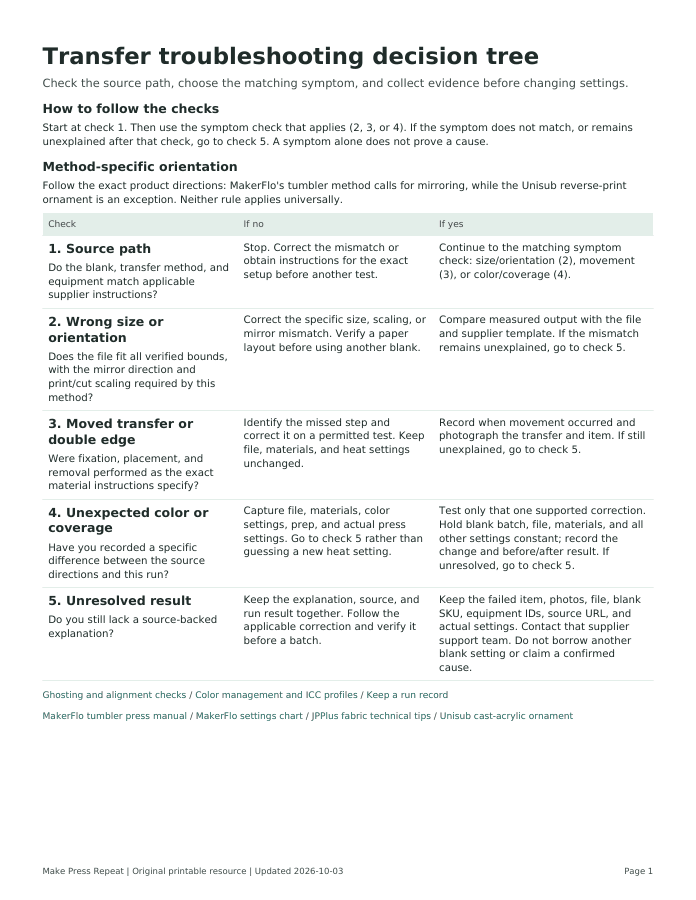
Transfer troubleshooting decision tree
Check the source path, choose the matching symptom, and collect evidence before changing settings.
Fill temporarily online. Entries and checkmarks are not saved or included in any download. Print this page to keep your current entries. PDF downloads are blank worksheets or references; the cost XLSX starts with example numbers and the material-log XLSX starts blank.
How to follow the checks
Start at check 1. Then use the symptom check that applies (2, 3, or 4). If the symptom does not match, or remains unexplained after that check, go to check 5. A symptom alone does not prove a cause.
Method-specific orientation
Follow the exact product directions: MakerFlo's tumbler method calls for mirroring, while the Unisub reverse-print ornament is an exception. Neither rule applies universally.
1. Source path
Do the blank, transfer method, and equipment match applicable supplier instructions?
- If no
- Stop. Correct the mismatch or obtain instructions for the exact setup before another test.
- If yes
- Continue to the matching symptom check: size/orientation (2), movement (3), or color/coverage (4).
2. Wrong size or orientation
Does the file fit all verified bounds, with the mirror direction and print/cut scaling required by this method?
- If no
- Correct the specific size, scaling, or mirror mismatch. Verify a paper layout before using another blank.
- If yes
- Compare measured output with the file and supplier template. If the mismatch remains unexplained, go to check 5.
3. Moved transfer or double edge
Were fixation, placement, and removal performed as the exact material instructions specify?
- If no
- Identify the missed step and correct it on a permitted test. Keep file, materials, and heat settings unchanged.
- If yes
- Record when movement occurred and photograph the transfer and item. If still unexplained, go to check 5.
4. Unexpected color or coverage
Have you recorded a specific difference between the source directions and this run?
- If no
- Capture file, materials, color settings, prep, and actual press settings. Go to check 5 rather than guessing a new heat setting.
- If yes
- Test only that one supported correction. Hold blank batch, file, materials, and all other settings constant; record the change and before/after result. If unresolved, go to check 5.
5. Unresolved result
Do you still lack a source-backed explanation?
- If no
- Keep the explanation, source, and run result together. Follow the applicable correction and verify it before a batch.
- If yes
- Keep the failed item, photos, file, blank SKU, equipment IDs, source URL, and actual settings. Contact that supplier support team. Do not borrow another blank setting or claim a confirmed cause.
Sources
Instructions vary by exact product and method. Follow each supplier source for the current product-specific directions.
- MakerFlo tumbler press manualhttps://drive.google.com/file/d/1ZNNSM7voNVyFuz6G0s1cHg8vq-RjBIjw/view?usp=sharing
- MakerFlo settings charthttps://makerflo.com/pages/sublimation-times-temps
- JPPlus fabric technical tipshttps://www.jpplus.com/mwdownloads/download/link/id/4566/
- Unisub cast-acrylic ornamenthttps://www.jpplus.com/unisub-cast-acrylic-ornaments-for-sublimation?sku=UN4937-PKG
Use terms
You may download, print, and use these original worksheets for your own projects, including projects you sell. Do not resell, repackage, or redistribute the files themselves without written permission.
Page address: https://makepressrepeat.com/resources/troubleshooting-decision-tree